
.svg)


.svg)





best ipad app for construction
Empowering the field team
Now your superintendents and foremen can access Lookaheads easily on their iPads while walking the job site
Project Portfolio
Gain a comprehensive overview of your projects right from the home screen.
Lookahead Views
Visualize your Lookaheads in one click. Plan and coordinate tasks, ensuring smooth project execution and proactive planning.
Task Progress
Easily manage your tasks and update progress to keep your schedule updated in real time.
Manage changes from the field
With the iPad app you have the ability to manage your Lookaheads directly from the job site.
You can easily make changes as you walk the field, adjust sequencing, tag the responsible party, and even see and create new roadblocks as you encounter issues in the field.
Learn more about lookahead module
Everyone on the same page
Our construction scheduling iPad app allows unlimited users, that means that subcontractors can also have access to their plan and they can easily filter by their name or company name to see only the scope of work that they are assigned to and be able to coordinate their crews.
Get startedCreate roadblocks directly in the field
Now using Outbuild's construction iPad app it's easier to create roadblocks directly in the field as you see the issue instead of going back to your computer. You can now centralize roadblock tracking and resolve them on time to prevent rework and delays.

Request schedule changes as work shifts
When lookahead tasks move beyond their planned bounds, the field can initiate schedule change requests with a few taps. These requests automatically notify project schedulers, creating a seamless feedback loop that keeps the master schedule accurate and up to date.
Get startedWhat our customers are saying.
From billion-dollar companies to smaller family-owned businesses. They all believe that construction deserves a better scheduling and planning tool.


.webp)
.webp)

Your crew already has the phones. Let them use them.
The mobile app lets foremen and trade leads confirm daily tasks, log roadblocks, and document work with photos. From any smartphone, anywhere on the jobsite.
Learn more about the mobile app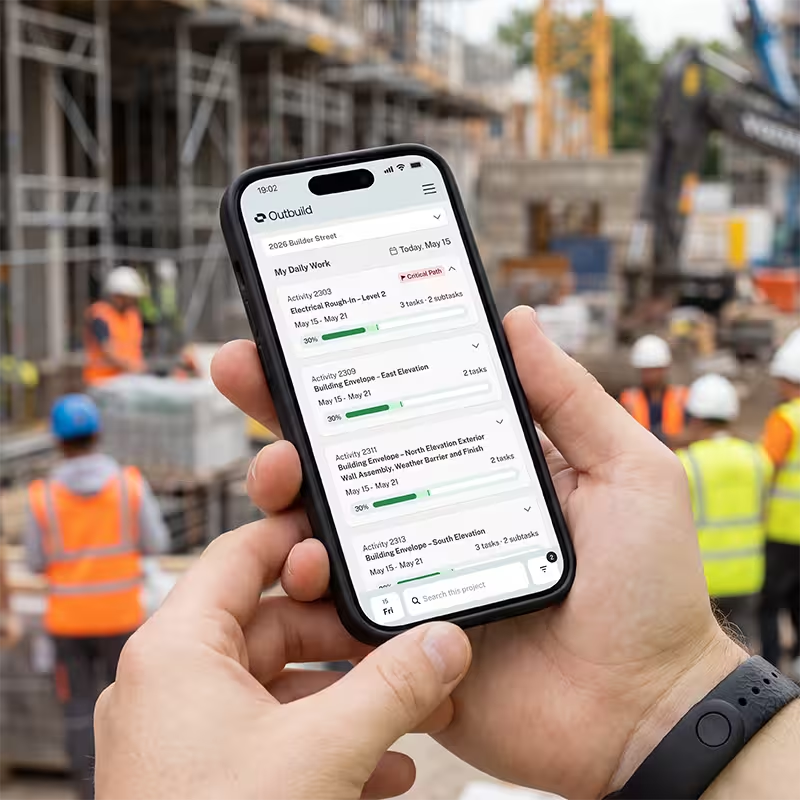
Ready to see Outbuild?
Join hundreds of contractors from 10+ countries that are saving money by scheduling better



We’ll be in touch soon!